Kodi, the acclaimed open-source media player, remains a cornerstone for users worldwide looking to centralize their entertainment. From local media libraries to accessing free streaming content, its versatility through third-party Kodi add-ons makes it incredibly powerful. But what if you want to stream without premium services like Real-Debrid? You’re in luck! This comprehensive guide will delve into the world of Kodi addons no Debrid—showcasing the best options still working in late 2025 and heading into 2026, offering practical installation steps, and crucially, emphasizing the vital security and privacy measures you must take.
Navigating free Kodi streaming links can be challenging, often fraught with unreliable sources and potential pitfalls. Our focus is to empower you with accurate, up-to-date information, helping you find best free Kodi addons for movies TV shows while ensuring you understand the necessary precautions to stream smart, stream free, and stream securely.
Understanding ‘No Debrid’ Streaming: Pros & Cons
“No Debrid” streaming refers to using Kodi add-ons that source links directly from free hosting sites and public domains. Unlike premium unrestricted downloading services such as Real-Debrid, AllDebrid, or Premiumize (which cache streams for reliability and quality), these Kodi addons that work with free sources rely solely on publicly available content.
Advantages of No Debrid Streaming
The primary draw for kodi addons no debrid is clear:
* Completely Free: This is the undisputed main advantage. It incurs no direct cost, making a vast library of entertainment accessible to everyone, without any subscription fees.
Disadvantages of No Debrid Streaming
While the “free” aspect is appealing, it comes with significant trade-offs that set realistic expectations for users:
* Unreliability and Broken Links: Free links are inherently unstable. They frequently go offline, become oversaturated, or simply don’t play. This often leads to frustrating searches for working streams and can make finding specific content a chore.
* Lower Quality and Buffering: Expect streams to be predominantly of lower quality (often Standard Definition). While High Definition (HD) or 4K links can occasionally be found, they are rare and inconsistent, especially for older content. Moreover, these streams are highly prone to buffering due to source limitations and potential Internet Service Provider (ISP) throttling.
Legal Ambiguity and Security Risks: Many third-party Kodi add-ons* that scrape free sources are unofficial and may link to content from legally questionable origins. This increases the risk of inadvertently accessing copyrighted material, which is illegal in many regions. Furthermore, because these add-ons bypass Kodi’s official vetting process, they can be potential conduits for malware, viruses, or data theft.
The Best Kodi Addons (No Debrid) – Vetted & Updated List (Last Verified: December 2025)
For users committed to free streaming without Debrid services, several add-ons have been reported to be working and provide free movie sources Kodi. It’s crucial to set realistic expectations regarding stream quality and reliability, as detailed above.
Working No-Debrid Kodi Addons
Here are some of the best Kodi addons without real Debrid that are currently providing free streaming content:
* Scrubs V2:
* Overview: Highlighted as a top option for free links, Scrubs V2 is robust and regularly updated, working well with Kodi 21 Omega. It offers a wide selection of movies and TV shows.
* Features: Supports IMDb and TMDb styles, and allows Trakt integration for tracking your viewing history.
* Expectation: Users should be prepared to sift through multiple free links to find a stable and good quality stream.
* Elementum:
* Overview: Unique for its BitTorrent technology, Elementum is capable of delivering higher quality content (HD and even 4K) without the need for Debrid services.
Consideration: Due to its torrenting nature, using a VPN is strongly recommended* for privacy and security when using Elementum.
* Gratis:
* Overview: Touted as a reliable “Non-Debrid” add-on, Gratis offers high-quality on-demand movies, TV shows, live sports, and channels.
Performance: It was reported to be working extremely well with multiple source options as of October 2024, making it one of the top Kodi addons no Debrid required*.
* Diggz Free99:
* Overview: As a fork of Scrubs, Diggz Free99 is noted for its modified scrapers that provide quicker free links.
* Performance: It was working very well in December 2025, offering a streamlined experience for free content.
* Ghost (1-Click Free section):
* Overview: Part of The Crew Repository, Ghost includes a dedicated “1-Click Free” section specifically designed for movies.

Kodi Setup Guide 2026: Future-Proof Your Entertainment Hub
Read More →Features: Provides a straightforward way to access free Kodi movie addons* with minimal fuss.
* EasyFlix:
* Overview: This non-debrid add-on provides one-click options for TV series and films, focusing on fast playback.
Simplicity: Great for users looking for quick access to Kodi tv show addons no debrid*.
* Asgard:
* Overview: While Asgard does support Real-Debrid, it also offers a substantial selection of non-Debrid content for movies, TV shows, and sports, making it a versatile choice.
Official and Reliable Free Addons (No Debrid Required)
Beyond third-party scrapers, Kodi also boasts official add-ons that offer completely legal and free content, often ad-supported:
* Pluto TV: An official Kodi add-on providing over 1,300 free live TV channels from various countries, along with on-demand movies and TV shows, all ad-supported.
* Crackle: Another official Kodi add-on offering a selection of free classic movies and TV shows, perfect for nostalgic viewing.
* The Roku Channel: An official add-on that provides access to dozens of free live channels, expanding your live TV options.
* YouTube: The official YouTube add-on allows users to stream YouTube content directly within Kodi, potentially without ads if configured correctly.
Step-by-Step Installation Guide for Kodi Addons (No Debrid)
Learning how to install Kodi addons without Real Debrid typically involves a common procedure for most Kodi repositories. Follow these steps to get your chosen add-ons up and running:
1. ### Enable Unknown Sources
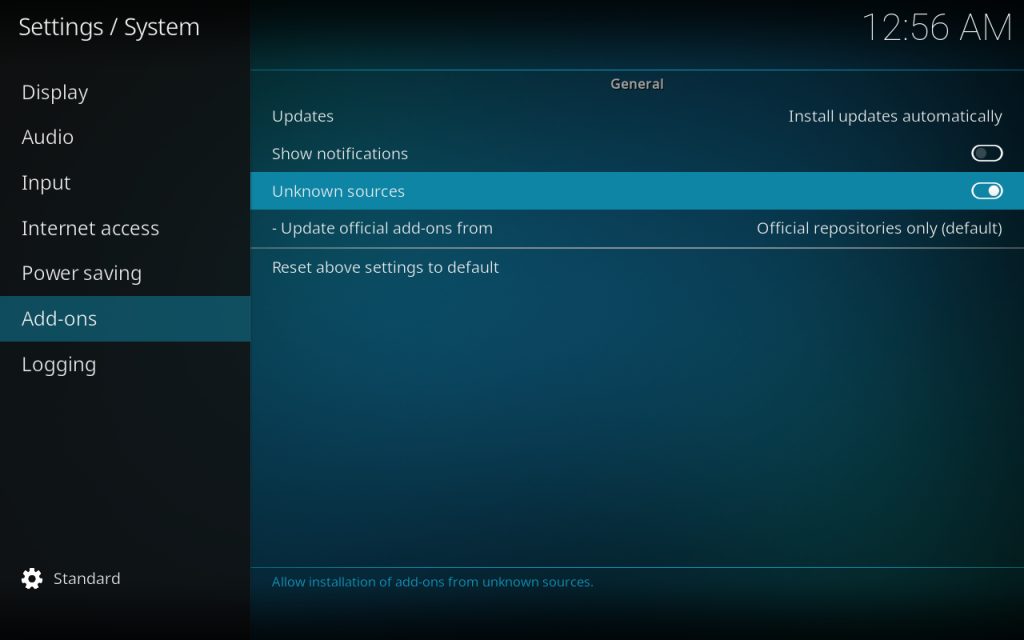
From the Kodi home screen, navigate to Settings (gear icon) > System (or System settings) > Add-ons. Enable the “Unknown sources” option. Confirm the warning by clicking “Yes”. This step is crucial for installing third-party Kodi add-ons.
2. ### Add File Source
Go back to Settings > File manager. Double-click Add source, then click <None>. Enter the exact URL of the add-on’s repository (e.g., https://repo.example.com/) and click OK. Provide a memorable name for the media source (e.g., “ExampleRepo”) and click OK again.
3. ### Install from Zip File (Repository)
Return to the main Add-ons menu and click the Package installer icon (the open box icon) at the top-left. Select Install from zip file. Choose the name you assigned to the source in the previous step (e.g., “ExampleRepo”), then select the repository’s .zip file (e.g., repository.example.zip). Wait for the “Repository Installed” notification to appear.
4. ### Install from Repository (Addon)
Again, from the Add-ons menu, click the Package installer icon. Select Install from repository. Choose the repository you just installed. Navigate to Video add-ons (or the relevant category like “Program add-ons”), find the desired add-on (e.g., “Scrubs V2”), click on it, and then click Install. Confirm any additional dependencies. Wait for the “Add-on installed” notification.
Once installed, you can typically find and launch your new add-on from the Video add-ons section. Take some time to explore its settings and content categories.
Crucial: Security & Privacy Best Practices for Free Kodi Streaming
When using Kodi addons no Debrid, especially unofficial ones, prioritizing your security and privacy is not just a recommendation—it’s paramount. The open nature of Kodi means you’re responsible for the add-ons you install.
Why a VPN is Absolutely Essential
A Virtual Private Network (VPN) is your first line of defense. For Kodi streaming links from unofficial sources, a VPN:
* Protects Your Privacy: It encrypts your internet traffic, making your online activities anonymous to your Internet Service Provider (ISP), government agencies, and potential snoopers. This is vital when accessing content from legally ambiguous sources.
* Avoids ISP Throttling: ISPs sometimes intentionally slow down your internet speed when they detect high-bandwidth activities like streaming, leading to frustrating buffering. A VPN masks your activity, preventing your ISP from identifying and throttling your connection.

Kodi 20 Nexus Install Guide: All Devices & Troubleshooting
Read More →* Bypasses Geo-Restrictions: Many streaming services are geographically restricted. A VPN allows you to connect through servers in different countries, potentially unlocking content unavailable in your region.
Recommended VPNs for Kodi
When choosing a VPN for Kodi media player features, look for providers with strong encryption, a strict no-logs policy, numerous server locations, and a kill switch feature. Top recommendations include:
* NordVPN
* Surfshark
* ExpressVPN
* IPVanish
* CyberGhost
Other Security Tips
Legality Concerns: While Kodi itself is legal, using third-party Kodi add-ons* to stream copyrighted content without permission is illegal in many jurisdictions. Kodi’s developers distance themselves from and condemn piracy. While enforcement often targets content providers, individual streamers are not entirely immune from potential repercussions.
* Beware of Malicious Add-ons: Unofficial add-ons are not vetted by Kodi. They can pose significant security threats, including installing malware, viruses, or botnets, and stealing personal data. Always proceed with caution.
* Avoid “Fully Loaded” Kodi Boxes: Devices pre-installed with Kodi and numerous unofficial add-ons are often illegal and may contain hidden malware. It’s recommended to install Kodi from the official website on a clean device to maintain control over installed content.
Stick to Trusted Sources: Whenever possible, use add-ons from the official Kodi repository. When venturing into third-party options, research and select well-known, trusted Kodi repositories*.
* Regular Updates: Keep both your Kodi application and all installed add-ons updated to benefit from security patches and performance improvements.

Managing Expectations: The Reality of Free Kodi Streaming
The pursuit of Kodi addons no Debrid streaming often requires a significant adjustment in expectations. “Free” rarely means “flawless,” and understanding these realities is key to a less frustrating experience.
Understanding the Compromises
* Inconsistent Quality: Free streams are rarely consistently high-definition and often come with lower resolutions, more compression artifacts, and varying audio quality.
* Frequent Buffering: Due to limited bandwidth from free sources and potential ISP throttling (even with a VPN, though mitigated), buffering will likely be a common occurrence, disrupting your viewing experience.
* Broken Links and Search Frustration: Expect to encounter many non-working links. You’ll likely spend a good amount of time sifting through available sources to find a playable stream. This can be time-consuming and frustrating.
* Less Reliability than Debrid: This is perhaps the most significant point. Premium Debrid services offer a dramatically more reliable and higher-quality streaming experience for a small monthly fee. For frequent users, the trade-off in cost often proves worthwhile due to the enhanced reliability and stream quality.
Patience is a virtue when relying on Kodi addons free streaming. Recognize that you are getting content for free, and with that comes certain limitations.
Troubleshooting Common ‘No Debrid’ Issues
Users of what are the best kodi addons for streaming without debrid frequently encounter “No Stream Available” errors and buffering. Here’s how to tackle them:
Issue 1: “No Stream Available” / Broken Links
This is the most common complaint with free add-ons.
* Check Add-on Status: Ensure the add-on is still being maintained and is not outdated. Many free add-ons become defunct quickly. Look for recent updates or announcements from the developer.
* Clear Cache: Regularly clear the Kodi cache and add-on providers to refresh available links. This can often resolve issues where links simply aren’t appearing.
* Try Other Links/Sources: If one link fails, try another from the list provided by the add-on. Patience is key; you might need to click through several options.

Master Guide: Install The Crew Kodi (Latest Version) + Fix Common Errors
Read More →* Verify Internet Connection: A poor or unstable internet connection can also lead to stream unavailability.
Issue 2: Buffering & Stuttering
Buffering can ruin the streaming experience.
* Internet Speed Check: Perform a speed test. At least 15 Mbps is recommended for HD streaming. If speeds are consistently low, consider upgrading your internet plan.
* Optimize Kodi Settings: Enable hardware acceleration in Kodi’s player settings (Settings > Player > Videos > Allow hardware acceleration) to offload processing to your device’s GPU, reducing CPU strain.
* Clear Cache: Clearing Kodi’s cache can significantly improve performance by removing old, unnecessary data.
* Update Software: Keep Kodi and all add-ons updated to their latest versions to benefit from performance improvements and bug fixes.
* Use a VPN: A VPN can prevent your ISP from throttling your bandwidth, potentially improving streaming speeds.
* Adjust Stream Quality: If buffering persists, try selecting a lower resolution stream (e.g., SD instead of HD) within the add-on or reducing the HQ scaler in Kodi’s expert player settings.

Tips for Optimizing Your Free Kodi Experience
To get the most out of your Kodi addons no Debrid 2026 guide journey, implement these optimization tips:
* Robust Internet Connection: A stable and fast internet connection is foundational. Position your Kodi device close to your Wi-Fi router, and minimize other devices hogging bandwidth on your network. Consider an Ethernet connection if possible for maximum stability.
* Kodi Configuration:
* Hardware Acceleration: As mentioned, enable this feature in Kodi’s settings for smoother playback and to utilize your device’s processing power efficiently.
* Regular Cache Clearing: Routinely clear the cache (Settings > File Manager > Profile directory > Add-on data > [Add-on name] > Settings.xml – delete this or use a maintenance add-on) to prevent performance degradation and free up space.
* Keep Software Current: Ensure Kodi and all add-ons are updated to their newest versions. Developers often release updates to fix bugs and improve performance or link scraping.
* Lightweight Skins: Consider using a less resource-intensive Kodi skin (e.g., Estuary, Arctic Zephyr) to free up system resources, especially on lower-powered devices like Fire Sticks.
* Utilize a VPN: Beyond security, a VPN can be a powerful tool for optimizing streaming speeds by bypassing ISP throttling, as discussed earlier.
* Manage Add-ons: Periodically review and uninstall any unused or broken add-ons to keep your Kodi installation lean and efficient. A cluttered Kodi can lead to slower performance.
* Explore Different Add-ons: Don’t rely on just one. If an add-on isn’t working well, try another from our vetted list or explore new ones. The landscape of free add-ons changes frequently.
Conclusion: Stream Smart, Stream Free, Stream Securely
The quest for free streaming via Kodi addons no Debrid is indeed viable in late 2024 and heading into 2025, with several reliable add-ons still working effectively. We’ve highlighted top contenders like Scrubs V2, Elementum, Gratis, and Diggz Free99, alongside official, legal alternatives like Pluto TV and Crackle, which provide excellent kodi media player features.
However, users must approach this method with realistic expectations regarding stream quality, reliability, and critically, a strong emphasis on security and privacy. The fluctuating nature of free Kodi streaming links means patience is key, and buffering or broken links will be part of the experience.
Most importantly, employing a reputable VPN is not just a recommendation but a crucial best practice for safeguarding your online activity and potentially enhancing your streaming experience by mitigating ISP throttling. By understanding the pros and cons, selecting vetted add-ons, following the installation guide carefully, and adhering to robust security protocols, you can navigate the free Kodi streaming landscape smartly, freely, and most importantly, securely. Enjoy your journey to unlock free streaming!