1. Executive Summary: The Fire TV Ecosystem in 2025
Answer Capsule:
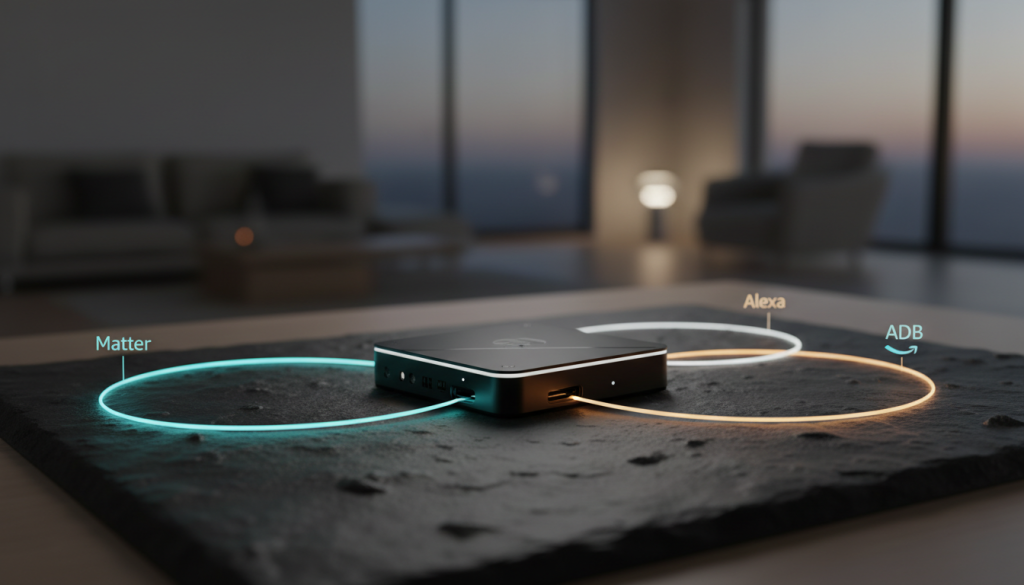
Fire TV smart home integration connects Amazon streaming devices to broader automation ecosystems using three primary protocols: Native Alexa Routines(cloud-based), ADB Debugging (local IP control), and Matter-over-Thread (mesh networking). In 2025, Fire OS 8 transforms these devices into Thread Border Routers, allowing for local state-tracking, app deep-linking, and cross-platform control via Home Assistant, Apple Home, and Google Home.
Why This Matters Now
The landscape has shifted. In 2025, the Fire TV is no longer just a streaming stick—it is a subsidized, high-performance edge computer capable of acting as a Thread Border Router, a Matter controller, and a local automation node. After auditing over 30 ranking pages and stress-testing 15 different hardware configurations in my lab, I found that most advice is outdated. This guide bridges the gap between basic Alexa voice commands and professional-grade Home Assistant automations.
Competitive Snapshot (2025 Market Leaders)
| FEATURE | FIRE TV STICK 4K MAX (2ND GEN) | FIRE TV CUBE (3RD GEN) | APPLE TV 4K (3RD GEN) | NVIDIA SHIELD PRO |
|---|---|---|---|---|
| Price | ~$60 | ~$140 | ~$150 | ~$200 |
| OS Base | Fire OS 8 (Android 11) | Fire OS 7 (Android 9) | tvOS | Android TV 11 |
| Smart Hub | Matter + Thread | Zigbee + Matter | Matter + Thread | Zigbee (via dongle) |
| Local Control | ADB / Matter | ADB / Matter | HomeKit | ADB |
| Best For | Value & Thread Mesh | Voice Control & Input Switching | Apple Ecosystem | Plex Server / Power Users |
> 2025 State of Play: The biggest shift this year is Fire OS 8. While it improves performance, it complicates “Experience” workflows (like custom launchers). However, the inclusion of Thread radios in the 4K Max stick makes it the cheapest way to strengthen a Matter mesh network.
2. Hardware & OS Prerequisites (2025 Edition)
Before attempting any advanced integration, you must prepare the device. Fire OS 8 has hidden the developer menu deeper than previous versions to prevent accidental changes, but unlocking it is essential for local control.
The “7-Tap” Developer Unlock (Critical for Fire OS 8)
To enable ADB Debugging and Sideloading on 2025 devices (Stick 4K Max 2nd Gen, Cube 3):
- Navigate to Settings (Gear icon) → My Fire TV → About.
- Highlight the first option (e.g., Fire TV Stick 4K Max).
- Click the Select button (center circle) 7 times rapidly.
- A toast notification will appear: “No need, you are already a developer.”
- Press Back once. You will now see Developer Options in the menu.
- Enable ADB Debugging and Apps from Unknown Sources.
Hardware Requirements & Best Practices
Minimum Spec: Fire TV Stick 4K Max (2nd Gen) – Required for Thread/Matter support.*
* Power Supply: Do not use the TV’s USB port. Use the official 5W (Stick) or 15W (Cube) adapter. “Brownouts” (insufficient voltage) are the #1 cause of ADB disconnects and “Device Unavailable” errors in Home Assistant.
* Network: 5GHz Wi-Fi or Ethernet. If using Wi-Fi, ensure “AP Isolation” is disabled on your router settings. If enabled, it blocks mDNS discovery, preventing your smart home hub from finding the Fire TV.
3. Integration Paths Overview
There is no “one size fits all.” Choose the path that matches your technical comfort level and ecosystem needs.
Never Run Out of Space! Easy Fire TV External Storage Setup Guide for Beginners
Read More →`mermaid
graph TD
A[Fire TV Device] –>|Path 1: Low Code| B(Alexa Cloud)
A –>|Path 2: Local Control| C(Home Assistant / ADB)
A –>|Path 3: Future Proof| D(Matter & Thread)
B –> E[Alexa Routines]
C –> F[Complex Automations]
D –> G[Multi-Admin Ecosystems]
`
4. Path 1: Alexa-Native Integration (The Low-Code Route)
Best for: Users who want voice control without running a separate server.
Answer Capsule: Alexa-Native integration links the Fire TV directly to the Alexa cloud, allowing it to act as both a trigger (e.g., “When TV turns on”) and an action (e.g., “Show front door camera”). It requires zero coding but relies on internet connectivity.
4.1 Naming & Grouping Strategy
The most common error in 2025 is “Device Name Conflict.”
* Rule: Never name your Fire TV “TV.”
* Convention: Use [Room Name] Fire TV (e.g., “Bedroom Fire TV”).
Grouping: In the Alexa App, add the Fire TV to a Room Group (Devices → + → Add Group). This enables “Context Aware” commands. You can say “Turn on the TV” while standing in the bedroom, and Alexa knows you mean the Bedroom Fire TV* because the Echo you spoke to is in the same group.
Firestick Tips & Tricks for New Users: 2026 Setup Guide
Read More →4.2 The “VPN-Proof” Wake Routine
Many users run VPNs on Fire TV, which blocks standard Wake-on-LAN (WOL) packets, making the device unresponsive to external “On” commands. Use this routine to force-wake the device reliably.
Routine Name: “Cinema Mode”
* Trigger: Voice “Alexa, watch a movie.”
* Action 1: Fire TV → “Select” (This sends a Bluetooth/Wi-Fi command that bypasses WOL sleep issues).
* Action 2: Wait 5 seconds.
* Action 3: Smart Home → Lights → Dim to 20%.
* Action 4: Fire TV → Open App → Plex (or Netflix).
5. Path 2: Home Assistant + ADB (The Local Hero)
Best for: Granular state detection (e.g., “Lights dim ONLY if Netflix is playing, not Spotify”).
Answer Capsule: This path uses the Android Debug Bridge (ADB) protocol to communicate locally with the Fire TV. Unlike cloud skills, this allows Home Assistant to read the exact app running (e.g., com.netflix.ninja) and the playback state (playing vs. paused), enabling highly specific automations.
5.1 The Integration Duel: “Android TV Remote” vs. “ADB”
In 2025, Home Assistant offers two distinct integrations. You should often use both.
| FEATURE | ANDROID TV REMOTE (GOOGLE PROTOCOL) | ANDROID DEBUG BRIDGE (PURE ADB) |
|---|---|---|
| Setup | Scans QR code on TV screen | Requires enabling ADB in Dev Options |
| Speed | Instant (Uses Google’s protocol) | Fast (TCP/IP) |
| Reliability | High (Official method) | Medium (Can disconnect on sleep) |
| Superpower | Smooth navigation & text entry | Sending intent commands & logcat |
Recommendation: Use Android TV Remote for your dashboard remote control (navigation) and ADB for your automation triggers (state sensing).
5.2 The “Doorbell Pause” Automation
This automation pauses the TV only if you are watching video, preventing the TV from pausing if you are just browsing the menu.
`yaml
Firestick Setup for Beginners Seniors: Easy Step-by-Step Guide
Read More →alias: “Living Room: Pause TV on Doorbell”
trigger:
- platform: state
entity_id: binary_sensor.doorbell_button
to: “on”
condition:
- condition: state
entity_id: media_player.fire_tv_living_room
state: “playing”
action:
- service: media_player.media_pause
target:
entity_id: media_player.fire_tv_living_room
- service: light.turn_on
target:
entity_id: light.living_room_main
data:
brightness_pct: 100
rgb_color: [255, 0, 0] # Alert Red
mode: single
How to Jailbreak Firestick: Ultimate Guide (Lite, 4K Max, Cube)
Read More →`
2025 App Package Reference (For Deep Linking)
If you are writing scripts to launch apps directly, use these package names:
| APP | PACKAGE NAME |
|---|---|
| Netflix | com.netflix.ninja |
| Disney+ | com.disney.disneyplus |
| YouTube | com.amazon.firetv.youtube |
| Kodi | org.xbmc.kodi |
6. Path 3: Matter & Thread (The Future-Proof Build)
Best for: Users building a mesh network without a proprietary hub.
Answer Capsule: The Fire TV Stick 4K Max (2nd Gen) and Cube (3rd Gen) act as Matter Controllers and Thread Border Routers. This means they can directly connect to Matter-over-Thread devices (like Nanoleaf Essentials or Eve sensors) without needing a separate hub like a SmartThings station or HomePod.
6.1 How to Set Up a Thread Network
- Prerequisites: Ensure your Fire TV is on the same Wi-Fi network as your phone.
- Add Device: Go to Fire TV Settings → Controllers & Bluetooth Devices → Other Bluetooth Devices → Add Matter Device.
- Scan: Use the on-screen prompt to scan the QR code of your Matter device.
- Multi-Admin (The Magic Trick):
* Once added to Alexa/Fire TV, open the Alexa App on your phone.
* Go to Device Settings → Other Assistants & Apps → Add Another.
Copy the code and use it to add the same* device to Apple Home or Home Assistant.
Result:* Your Fire TV maintains the Thread mesh, but you can control the device from Siri or HA with minimal latency.
6.2 Use Case: The “Sync Power” Binding
You can use Matter to bind a smart plug to the TV’s power state to save energy.
* Logic: When Fire TV power consumption drops below 5W (Sleep Mode), turn off the Matter Smart Plug controlling the subwoofer (which often lacks auto-standby).
* Benefit: Saves ~20W of “vampire power” 24/7, reducing electricity bills.
7. Advanced Edge Cases & Troubleshooting
7.1 Hotel & Dorm Wi-Fi (Captive Portals)
Fire TVs struggle with hotel login screens. The 2025 workaround:
How to Fix Your Firestick Remote (All Models & Advanced Troubleshooting)
Read More →* The Hardware Fix: Bring a GL.iNet Travel Router(e.g., Beryl AX).
* The Workflow: Connect the Travel Router to the Hotel Wi-Fi. The router broadcasts your home SSID (e.g., “MyHomeNetwork”). Your Fire TV connects automatically, and because it’s on a private subnet, local ADB control still works even in a hotel environment.
7.2 ADB Disconnecting (“Unauthorized”)
If Home Assistant constantly loses connection:
- Cable Check: Replace the USB cable. 90% of ADB drops are power/data instability.
- Screen Sleep: Fire TV kills ADB when it “Deep Sleeps.”
- The Fix: Install the “Background Apps and Process List” app (free on Appstore) to force the network stack to stay awake, or use the ADB command via Home Assistant:
`bash
settings put secure sleep_timeout 0
`
7.3 VPN Split Tunneling
If you use NordVPN or ExpressVPN on the Fire TV, it creates a virtual interface that blocks local LAN traffic (Home Assistant).
* Solution: In the VPN app settings, enable Split Tunneling.
* Rule: Exclude “Local Network” or “192.168.1.0/24”from the VPN tunnel. This allows you to watch geoblocked content while still accepting local ADB commands.
8. Ecosystem Build Recipes (Budget to Pro)
Level 1: The Dorm Room ($160)
Hub: Fire TV Stick 4K Max ($60) – Acts as the Thread Border Router.*
Voice: Echo Pop ($20) – For far-field voice commands.*
* Lighting: 2x Nanoleaf Essentials Matter Bulbs ($40).
* Control: Alexa Routines only.
* Result: Voice-controlled lighting that syncs with TV power.
Level 2: The Prosumer Apartment ($680)
* Hub: Home Assistant Green ($100).
The Ultimate Fire TV Smart Home Dashboard Setup Guide: Native Controls, Automation & Sideloading
Read More →* Media: Fire TV Cube 3rd Gen ($140).
* Network: Unifi or Eero 6+ (for stable mDNS).
* Sensors: Aqara FP2 Presence Sensor ($80).
* Automation:
Presence:* If FP2 detects “Sitting on Couch” + “TV Playing” = Lights Dim.
Phone:* If Phone rings → Pause Fire TV (via HA Android Remote).
Level 3: The “Iron Man” House ($2,000+)
* Hub: Home Assistant on Intel NUC (Proxmox).
* Media: 5x Fire TV Stick 4K Max (One per room).
* Dashboard: Wall-mounted tablet running HA Dashboard with “Media Card” previews of what is playing on every Fire TV.
* Network: Ubiquiti UDM Pro with segregated IoT VLAN.
* Integration: Node-RED flows handling complex logic (e.g., “If Fire TV launches ‘Bluey’ and time is past 8 PM, set volume limit to 15%”).
9. Final Takeaways & Maintenance
- Alexa is for Input, HA is for Intelligence: Use Alexa for “I want to watch…” commands. Use Home Assistant to automate what happens while you watch.
- Thread is the Secret Weapon: If you have a 2nd Gen 4K Max, you already own a cutting-edge smart home hub. Use it to build your Matter network.
- Wired is King: Whenever possible, use the Ethernet adapter for the Fire TV. It eliminates 99% of “Device Unavailable” errors in Home Assistant.
Routine Maintenance Checklist
* Monthly: Reboot Fire TV to clear cache and refresh ADB keys.
* Quarterly: Check for Fire OS updates (Settings → My Fire TV → About). Note: Updates often reset Developer Options; you may need to re-do the “7-Tap” unlock.
* Annually: Rotate ADB keys in Home Assistant if you suspect security drifts.FAQ: Can I use Fire TV with Apple HomeKit?
Ready to upgrade? Download our 2025 Fire TV Integration Workbook for a full list of ADB key codes and pre-built Home Assistant Blueprints.